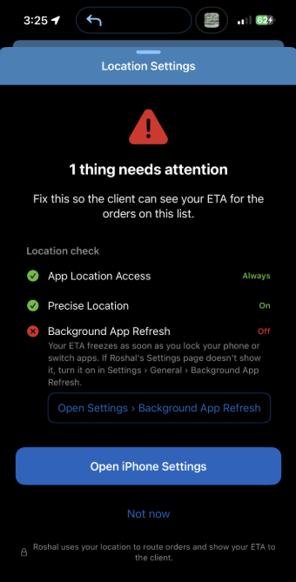
If you are in the Roshal Health app and see this message, usually you need to update the Background App Refresh settings to allow for better Location data to be collected:
However, if you click Open iPhone Settings and see that the settings look correct, there is likely another iPhone setting that is overriding this page:
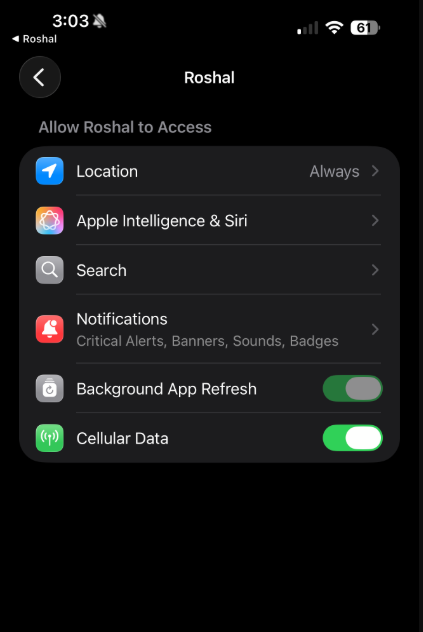
The "greyed out" toggle for Background App Refresh always means something above the app is overriding the actual app choice. The switch itself keeps showing the app's stored preference (which is why it's still green) — iOS just makes it non-interactive because that preference isn't what's in effect right now.
Here are three things that typically cause this issue and how to fix them:
1. Low Power Mode — the most common issue: iOS suspends background refresh device-wide and dims both the global and every per-app toggle in place.
- This is the first thing to check and will require you to charge your phone.
2. A restriction of some kind in Settings — Screen Time → Content & Privacy Restrictions → Background App Activities = Don't Allow, or the same thing pushed by MDM on a supervised device.
- You will need to change that setting from Don't Allow to Allow.
3. Settings → General → Background App Refresh = Off — the phone-wide kill switch. On recent iOS this usually hides the per-app row entirely rather than dimming it, but it's the third candidate.
- This has been the most common cause we have seen with users so far and changing this setting from Off to On usually fixes the app!
If you are still having issues after making those changes, please contact the IT Helpdesk at it-helpdesk@roshalimaging.com .