Summary: This article explains how to send a referral using the Provider App.
How to Send a ReferralYou can send a referral through the Provider App by following these steps:
- Open the Provider App on your device.
- Locate the Referral Sections:
- Look for the 'Client Referrals' section to refer a client.
- For provider referrals, find the 'Provider Referrals' section.
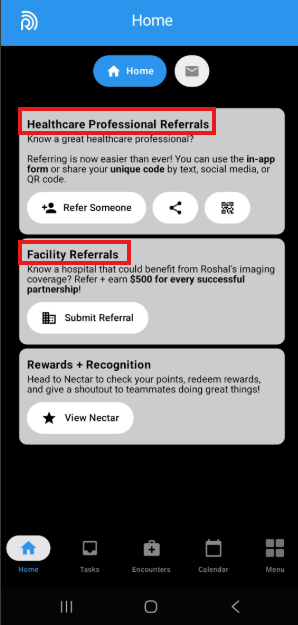
- Submit Information:
- Enter the client’s contact information in the appropriate section for client referrals.
- For provider referrals, submit the provider information as required.
- Complete the Submission: Follow any additional prompts to finalize your referral submission.
By submitting referrals through the app, you may also have the opportunity to receive a bonus for successful referrals.
ConclusionSending a referral is a straightforward process that can be completed through the Provider App. Make sure to enter the correct contact information to ensure successful submissions.
If you have further questions or need assistance, feel free to reach out to the IT Helpdesk at it-helpdesk@roshalimaging.com.
If you would like to know the status of a referral, please contact HR at HR@roshalimaging.com