When entering a Per diem entry in the Roshal Imaging app, you may get an error message stating a Per diem expense already exists for this provider on that date. To resolve this error, email the Roshal IT Helpdesk at it-helpdesk@roshalimaging.com and ask them to update the conflicting entries.
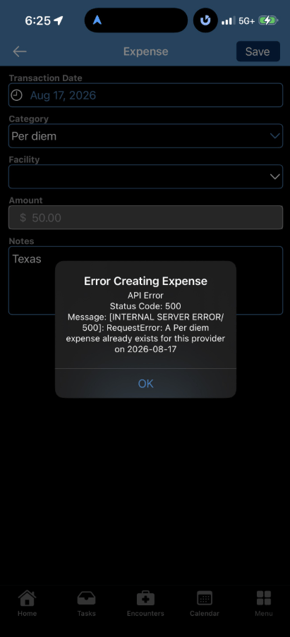
Why does this Per diem error occur?
This error usually means a Per diem entry for the day before or after the one you are trying to enter was saved on the current date instead. This is typically caused by how the time value for your entry is saved in the system.
How do I fix the duplicate Per diem entry error?
Email the Roshal IT Helpdesk and ask them to update the conflicting entries:
- Email:
it-helpdesk@roshalimaging.com - Include: A screenshot of the error, similar to the example shown in this article.
Send the email to it-helpdesk@roshalimaging.com and include a picture like the one in this article if possible.