After entering/updating all of the DICOM info, there are times when the iPad(s) will not successfully PING or VERIFY the connection. This is often due to Local Network Access not being granted when setting up the DICOM connection.
The popup to allow that only comes up when you hit VERIFY for the first time after entering the DICOM information. It doesn't clearly state what it is for so it can be easy to miss. Try the following steps and see if VERIFY works.
Go to the Settings app on the iPad, then scroll down the menu on the left and go to Apps -> Kosmos -> and look for Allow Kosmos to Access. There should be a setting for Local Network that needs to be turned on, seen here:
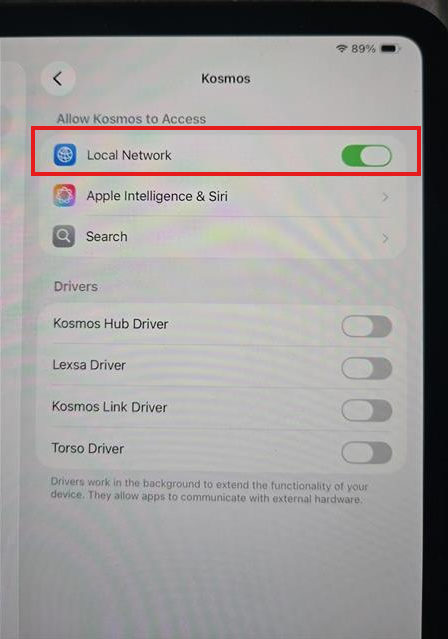
Once you have turned that on, go back to the Kosmos app and hit Verify and it should succeed now!